
Divine Frequency HUD and Inventory Screen Explained
What Divine Frequency Steam screenshots show on the HUD and inventory: PT/PR/ER, Radiation, fire modes, Attribute panel—only where sources define them.
FAQ
What tabs does the Divine Frequency inventory have?
What do PT, PR, and ER mean on the HUD?
How does Radiation work in Divine Frequency?
What are Exaltation, Mutation, and Attunement?
How do fire modes work in Divine Frequency?
What does the Divine Frequency HUD show?
Divine Frequency by Abraxaes overlays combat information around the edges of the screen in official Steam marketing captures. The meaning of several labels is documented only as far as the pixels go—for example PT, PR, and ER appear as three percentage stats, but no source reviewed expands those acronyms. This guide maps zones to what screenshots show versus what public text explains, so you can read the UI without importing mechanics from other games. Pair menu options with settings and keybinds and, if HUD scale affects performance, stutter fixes (HUD scaling exists per demo patch notes; community threads tie HUD size 1.0 to stutter—single-source).
Which HUD elements sit where?
| Zone / element | What the screenshot shows | What the sources say it does |
|---|---|---|
| Top-left — portrait & bars | Character portrait; red health bar (e.g. 100/100); second bar (e.g. 10/10) | Health bar implied; second bar purpose not documented in sources reviewed |
| Top-left — PT / PR / ER | Three percent readouts labelled PT, PR, ER | Labels only — meaning not documented; do not expand acronyms |
| Top-left — Radiation | Radiation meter (e.g. 0/200) | Radiation tracked on HUD; Canned Fruit heals 50 Radiation (screenshot #8) |
| Top-left — second meter | Purple-tinted meter under Radiation: 0/100 in most captures, 16/100 in the one whose log reads “Player absorbs Toxin (1)” | Not named on screen and not documented; any link to Toxin is an inference |
| Bottom-right — quick slot | Slot labelled Tab | Tab shown as label; behaviour not documented in reviewed text |
| Bottom-right — fire mode | Text STANDARD, SEMI-AUTO, or FULL-AUTO beside [B] |
Modes named in HUD; control labelled [B] in screenshots—see fire-mode section |
| Bottom-right — weapon readout | DMG: Physical, Raw, High-Explosive, or Hypertrauma (screenshot #2); ammo (e.g. 41 | 150) | Damage type labels on HUD; no full type chart in official prose reviewed |
| Combat feedback | Log line “Player absorbs Toxin (1)” (screenshot #4) | Shows Toxin can apply to the player; not a complete toxin rules doc |
Interaction elsewhere: screenshot #10 shows environmental REFRIGERATOR text with descriptive copy and a numbered dialogue choice—evidence the UI uses named objects and prompt lines, not only combat HUD.
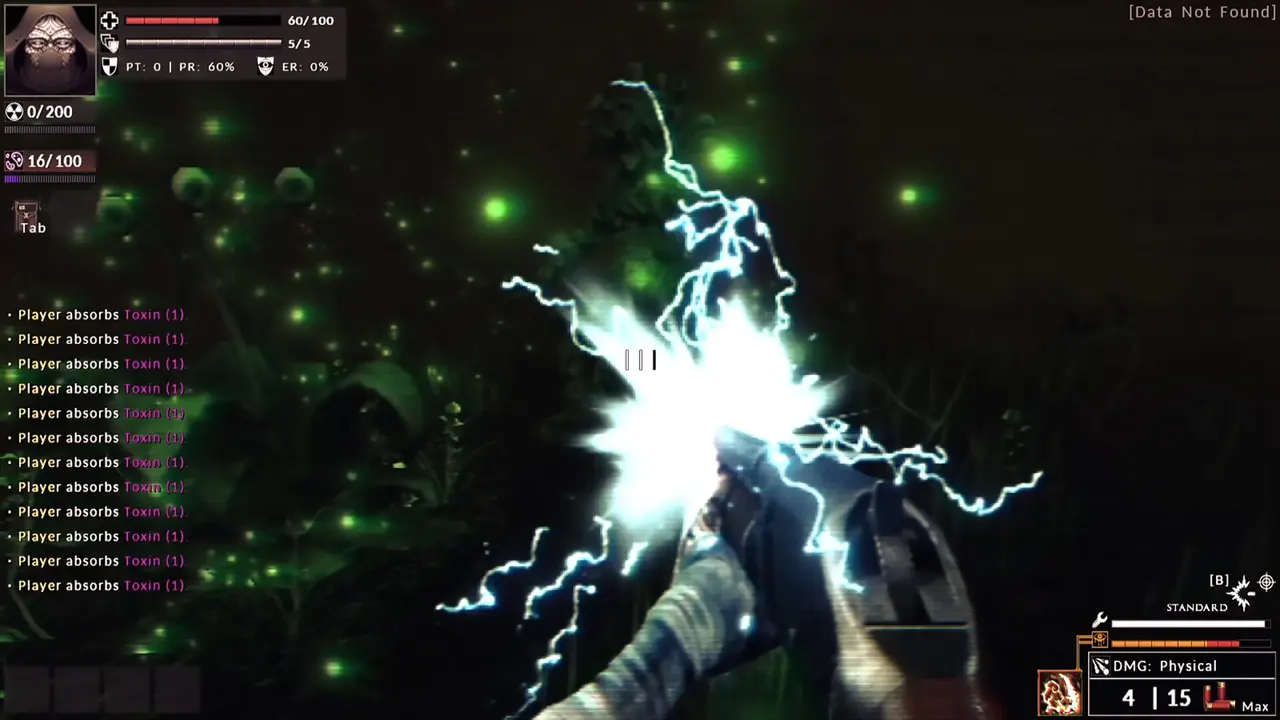
Image: Abraxaes, official Steam store screenshot #4. Build not stated.
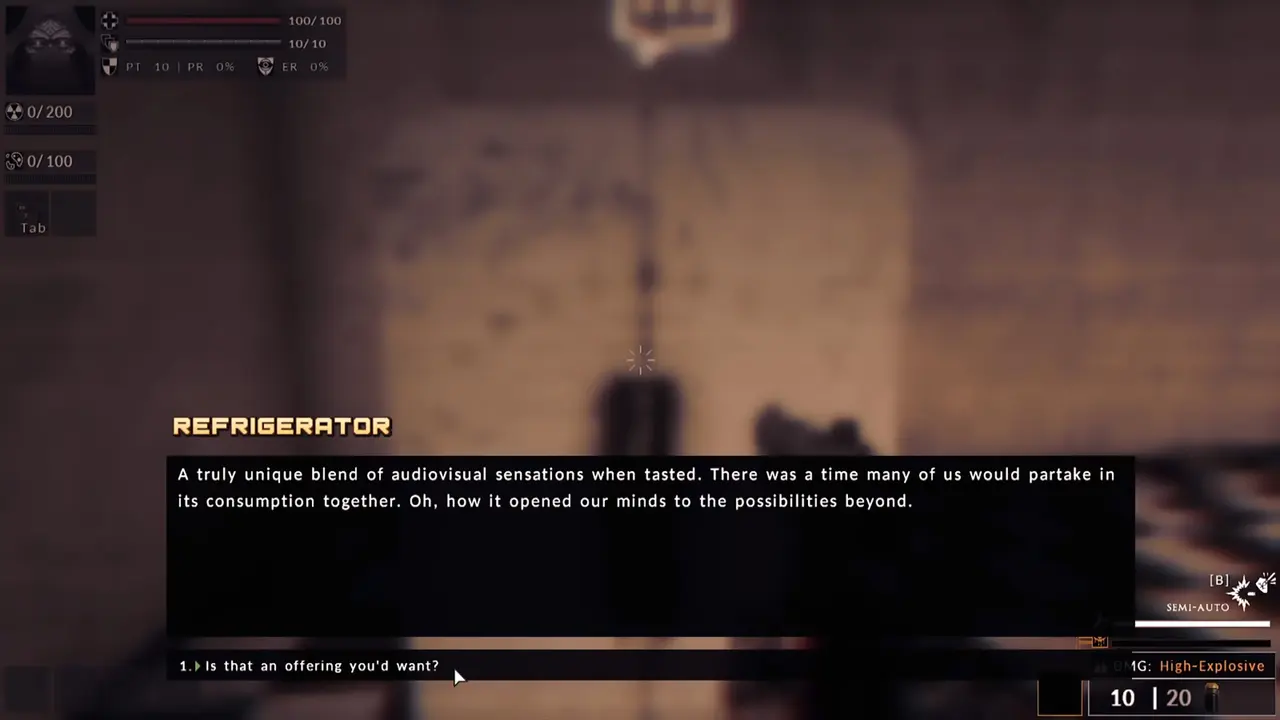
Image: Abraxaes, official Steam store screenshot #10. Build not stated.
What does the inventory screen show?
Steam store screenshot #8 (official):
- Tabs: Inventory, Weapons, Bestiary, Map
- Location label: Abandoned Complex
- Panels: Consumables & Medications (3/4), Skills & Techniques, Attribute, Condition, Current Objective
- Attribute panel: LEVEL 1, Avatar: Acolyte; Strength 0, Wits 1, Physique 0; Exaltation 0, Mutation 0, Attunement 0/2
- Example item — Canned Fruit: Restore 20 HP; Heal 50 Radiation; Cleanse 30 Toxin; hints
[Mouse1] Use Item/[Mouse2] Options
The Steam store describes three primary character archetypes—Strength, Wits, Physique—affecting challenges and discoveries; the screenshot shows starting-style numbers on one Acolyte row, not a verified endgame stat sheet. For archetype framing, see best builds.
Open the Bestiary tab from the same screen to see enemy list entries documented on known enemies and weaknesses. Project Lead thread text mentions a bestiary / weapon codex (single-source)—the UI tab aligns with that idea; full codex behaviour is not spelled out in the captures alone.
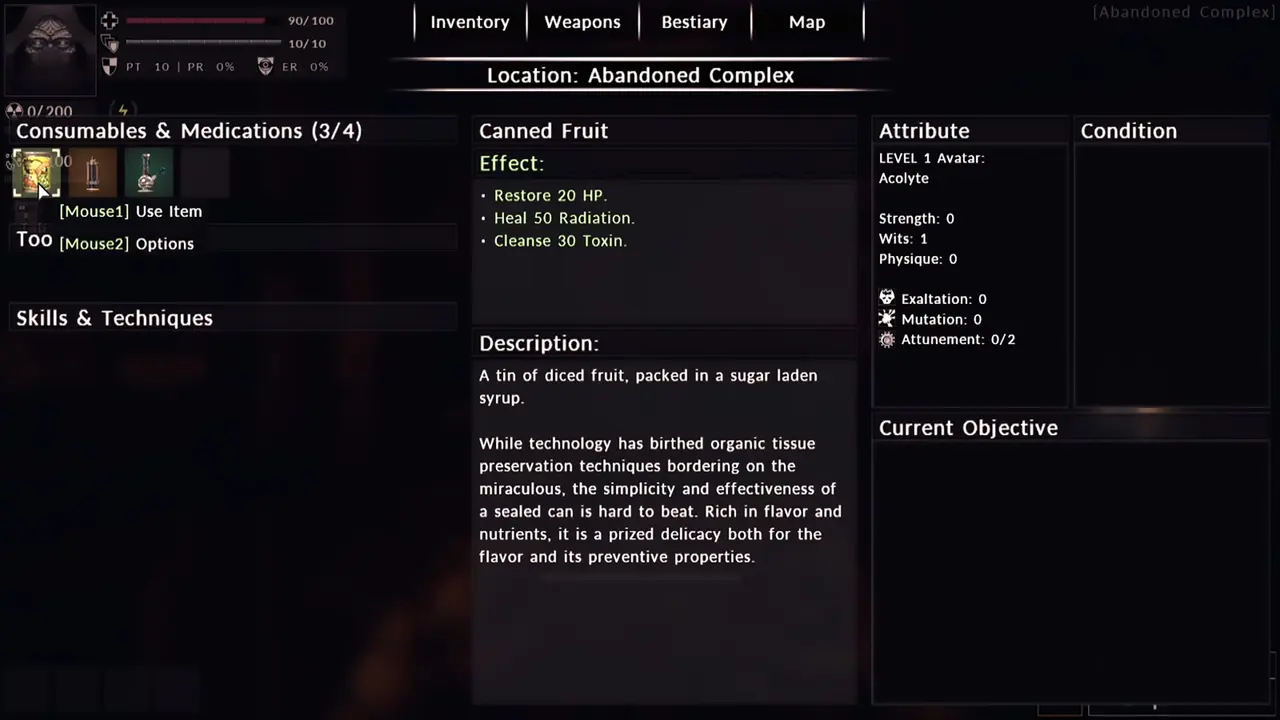
Image: Abraxaes, official Steam store screenshot #8. Build not stated.
What can we say about fire modes?
Official HUD screenshots display STANDARD, SEMI-AUTO, and FULL-AUTO as the fire-mode label, with the control prompt [B] printed beside that label in the same UI cluster. That is what the marketing images show—we do not state as fact that B always toggles modes in every build unless you verify in-game; phrasing stays: screenshots label the control as [B].
Demo-era player feedback once said alternate fire modes felt missing in the demo (single-source). EA screenshots do show mode names on HUD—whether every weapon supports every mode is not documented here.
![Divine Frequency dim corridor seen through a rifle. The bottom-right weapon readout shows DMG: Raw, the FULL-AUTO fire-mode label with [B] above it, and ammo 41 | 150.](/images/articles/df-full-auto-corridor-hud.webp)
Image: Abraxaes, official Steam store screenshot #7. Build not stated.
Where does this information come from?
- Divine Frequency on Steam — Steam store screenshot #8 (official), inventory / Attribute / Canned Fruit (observed 2026-10-28); #2, #4, #7, #10 (official), combat HUD, PT/PR/ER, Radiation, Tab,
[B]fire modes, DMG types incl. Hypertrauma (#2), ammo, the purple second meter (observed 2026-10-28); #10 (official), REFRIGERATOR interaction copy (observed 2026-10-28); store Features text for three Strength / Wits / Physique archetypes (observed 2026-10-28). - Steam announcement — demo update Nov 7, 2023 — HUD scaling option added (Demo-era).
- Steam discussion — demo feedback — bestiary / weapon codex mention (single-source).
- Steam discussion — Wits demo feedback — alternate fire modes felt missing in demo (single-source).
Verified against the sources above on 2026-10-28.
Related Articles
bosses
Divine Frequency Bestiary: Known Enemies and Weaknesses
Thirteen Bestiary names from official Divine Frequency Steam screenshots, plus Kin stats, weakness labels, and what is still undocumented for Early Access.
guides
Divine Frequency Controller Support: Keyboard-Only at EA
Official answer: no full controller support at Early Access launch. Partial accessibility option, UI gaps, itch.io keyboard+mouse, and hedged Xbox reports.
guides
Divine Frequency Demo vs Early Access: What You Need to Know
Divine Frequency demo on Steam: free AppID 2641750, how it differs from Early Access, save carryover gaps, and whether to try it before buying.
Was this helpful?
Thanks for the feedback!